BBC News - Technology

Redmond Pie

Friday, October 19, 2012

10 tips to make your phone's battery last longer

Even hi-tech smartphones can last for days - as long as you follow a few basic procedures to keep the battery at full.


As smartphones have become more capable -  for playing gaming, watching movies and shooting video -  battery performance has worsened and now most modern smartphones won’t last a full a day before you need to reach for a charger.

Phone manufacturers are working hard to improve battery performance - Motorola in particular with their RAZR i and RAZR MAXX - but if you buy most other smartphones, be ready to charge every evening.
Here are some tips to help conserve your mobile phones battery life:

                  [Related: First pics of new iPad Mini appear on Twitter]

Power-saving mode
Modern Android and Windows Phone smartphones include power or battery saving modes typically located in the Settings menu. It is activated once the battery reaches a certain level, forcing battery intensive features - including push email, screen brightness and Facebook updates - to switch off. Unfortunately Apple doesn’t include any such power or battery saving features on its smartphones, although free apps like Battery Life Pro help monitor performance and shut down applications.

                       [Related: Get the best prices on mobiles here]


Screen brightness
The biggest drain on a mobile phone battery is the screen and unfortunately the bigger and brighter the screen, the more battery life it uses. Save battery power by selecting ‘Automatic brightness’ and the screen will adjust the brightness automatically depending on the lighting conditions. 

Alternatively, if the battery indicator is reaching precarious levels turn the brightness down as low as is comfortable to conserve as much power as possible. 

Make sure auto lock is activated, so when your phone isn’t being used the screen shuts down saving power.  

If you’ve got a phone with an AMOLED screen (such as the Samsung Galaxy S3 or S2) using a dark wallpaper may also help save battery.

Don’t vibrate
In a working environment where loud ringtones are frowned upon, instead of popping your mobile phone in vibrate mode, which uses your battery, use silent mode instead.

                        [Related: Which Android is best for you?]

Stop email sync
Your phone probably checks for emails every few minutes or if you’ve got a smartphone that supports push email, constantly. Every time your phone syncs or an email is ‘pushed’ though, it uses battery power. To change the rate of email syncing or to switch it off, go into the Settings menu of your smartphone and increase the interval your phone checks email, it varies from phone to phone, but we would suggest setting it to check every half hour, or to switch off sync completely. You can therefore manually check your email as and when you choose and save a sizable chunk of battery life in the process.

Reduce social networking updates
Getting Facebook and Twitter notifications delivered to your phone automatically (like push email) uses your battery, so turn notifications off. Most phones allow you to switch off all syncing with a simple toggle.

Turn connections off
WiFi, GPS and Bluetooth are found on most modern phones. Forget to turn your WiFi off when you leave the house and it will continually look for a WiFi connection, using the battery. So make sure you turn any connections off when you are not using them.

Shut down apps
Even if you are not using an application it may still be running in the background using the battery, so close any apps you aren’t using.  Do this on an iPhone by double tapping the menu button, pressing the program icon and click the minus button. 

On older Android smartphones, you may need a task manager to do this, however newer handsets running Android 4.0+ allow you to pull up a task manager by simply long pressing the home button. You can then thumb through your open apps and swipe them off screen to close them. You can even see what apps use the most battery in the settings of your Android smartphone.


Don’t download pictures
Downloading pictures when browsing or using email is something most of us do without thinking, but every time you download a photo it uses both data and power. So if you can live without pictures, turn them off in the internet browser’s settings menu.

Flash off
When taking photographs using your smartphone, be conservative with your flash use. In digital cameras the flash is a huge battery drain and the same applies to phones, so instead of leaving it in automatic mode, turn the flash off when taking photographs, only turning it on when necessary.

Night time = downtime
Night time is the time most people charge their smartphones, but if you don’t have a charger to hand make sure you turn your phone off at night.

Airplane mode
Smartphones are always trying to connect to a network, be it a cellular network, a wireless network or a data network. The harder they try and connect, the more battery they use. A
great way to save your battery is to switch on airplane mode when reception is poor or you’re underground. This stops your phone searching for signal when there’s none to be found and makes the best use of whatever battery you have left.

Accessories
If you’ve followed the above tips and your phone battery still doesn’t last very long, it’s time to consider a charging accessory. The Mophie JuicePack Air (£40) fits over your smartphone, doubling the battery life, alternatively if you don’t fancy changing the look of your phone consider a portable battery charger like Proporta TurboCharger 7000 (£54).

Follow us on twitter BosBod Inc.
Like our facebook page BosBod Inc.

Wednesday, October 17, 2012

The Sony Vaio Tap 20: A 20 Inch TabPC? PTab? Heck it’s 20 inch Tablet


In what the Samsung Galaxy Note did for phones Sony attempts to do with the Sony Vaio Tab 20 for tablets. That's right Sony has released a 20 inch 11.4 pound tablet into the world for a starting price of a mere 880 USD. Want to know more? Read on...
It's really just an all in one touchscreen PC with a battery. So what do you get in 880 dollar version? It will be running Windows 8 with some low to mid range specs:
  • Core i3 processor
  • 4GB of RAM
  •  500GB hard drive
  •  20-inch, 1,600 x 900
  • display can lie flat
  • the display is "drop-resistant"
  •  there's a rubber seal around the bezel (That makes the motherboard water resistant?)
  • display at least uses IPS technology, so it's safe to say you can expect decent viewing angles
  • NFC
  • 1.3-megapixel webcam
  • dual speakers
  •  subwoofer
Here is a hands on review of this beast from CNET

Sadly, I am tempted to put this on my tech geek list to Santa Claus this year and see if he truly does make all wish come true. Anyone with me?

Friday, October 5, 2012

iPhone 5 with The New EE 4G LTE Network - Incredible Speed!


iMore have posted a test with EE's -- formerly Everything Everywhere, the parent company of Orange and T-Mobile -- LTE 4G speeds on a selection of devices, including the iPhone 5.
As you will see from the video the data speeds are pretty impressive, both upload and download, and a real step in the right direction for the UK smartphone market. On the media event, iMore have managed to get the highest download speed which was just over 42mbps. What a terrible speed!
We have covered another 4G LTE on iPhone, which performed on Bell Mobility, the highest speed is only about 8 mbps, no more. And now you understand how fast is 42mbps on a mobile phone.
EE announced their LTE 4G network just a couple of weeks ago but we still do not have a date when it will actually go live (although they have said it wil be within weeks). When that happens, EE will be well positioned in terms of the competitive landscape. They'll be the first UK carrier able to offer an LTE iPhone 5, but also the only one.
Woo, I am waiting for 4G! Now take a look at the video:

You can follow us on Twitter or join our Facebook fanpage to keep yourself updated on all the latest on Apple and iOS(iPhone & iPad).

Wednesday, August 29, 2012

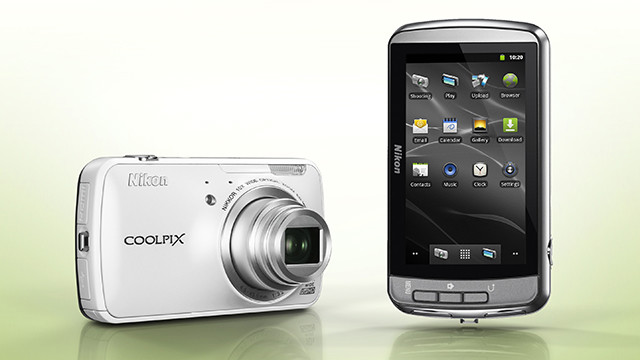
The gulf between smartphones and cameras is getting smaller, thanks to a new point-and-shoot camera from Nikon that's powered by the Android operating system.
The 16-megapixel Coolpix S800c camera, announced Wednesday, will be the first camera running Android on the market when it hits shelves in September.
The addition of Android brings a few much-needed features to the point-and-shoot. Users can download mobile apps from the Google Play store and share images over cellular networks by tethering to a nearby smartphone or tablet.


When phone makers first started adding tiny, low-resolution cameras to their devices, the camera industry was not terribly threatened. They had glorious digital SLR cameras with interchangeable lenses, sleek pocket cameras with large sensors and manual controls, and features like high-ISO for low-light shooting, megazoom, and rugged bodies for the outdoors.
Anyone who loved photos would certainly prefer the high-quality shots captured on "real" cameras, right?
But the camera companies underestimated just how important convenience was to consumers, and the public's appetite for sharing photos of moments right when they happened. The resulting cellphone images were low-quality, but nothing a little sepia-filter couldn't fix.
The iPhone was not the first phone to have a camera, but it made sharing images online, over its cellular connection, a snap. In 2011, more than a quarter of photos and videos were captured using a smartphone, according to a study from research company NPD Group. That number is only getting larger.
The $350 Coolpix S800c is bringing some of what has made those smartphones so popular to a camera. It doesn't have a cellular connection, but it does have Wi-Fi. Wireless connections have been around for a while on cameras, but the addition of Android means the camera can tether to a smartphone or tablet running Android when there's no Wi-Fi network handy.
The 3.5-inch touchscreen display gives users access to the Google Play store, where photogs can go to download more apps for their camera, including editing tools and social networks, such as Twitter, Facebook and, of course, Instagram. The camera can also run all the regular smartphone apps, allowing users to send e-mail, browse the Internet, listen to music and play games.
Like Apple's iPod Touch, it draws the line at making phone calls, however.
The camera has 10X zoom, can shoot 1080p video, and includes GPS and maps for tagging images with locations. There are no manual controls. The S800c is running Android 2.3, known as Gingerbread, which is not the most recent version of the operating system.
That Nikon is the first to bring an Android camera to market is a surprise, since competitors Sony and Samsung already make Android devices and were in a better position to combine the two products. Polaroid showed off a demo camera running Android at the Consumer Electronics show in January, the SC1630, but it isn't yet available.
Nikon's Android camera may be a first in the camera industry, but it's still playing catch-up to the real competitors: smartphones with increasingly higher-quality cameras.

Source: (CNN)